New · Sillon AutoLight is available on iPhone and iPad, macOS coming soon — with MagicFixture →

Your album is mixed. Now what?

Sillon gets your album ready for release: ISRC codes, the right level for each platform, CD or vinyl, running order and Panorama declaration. The home studio musician's mini-producer.

  • For Mac
  • Everything stays on your computer
  • Made in Quebec, in English and French
  • One-time purchase, no subscription
Sillon main window: the album with its five songs, the loudness and peak of each, ISRC code status, the VU meters and the player set to Spotify
Spotify−14 LUFS
Apple Music−16 LUFS
YouTube−14 LUFS
Amazon−14 LUFS
CD−11 LUFS
Vinyl−16 LUFS

The default targets, with a maximum peak of −1 dBTP. You can adjust every one of them.

Everything between the mix and the release

The mix is done and you're proud of it. What's left is a pile of technical details that have nothing to do with music. Sillon sorts them out with you, in order, without needless jargon.

Side A preparing the album

1

Drop in your songs, Sillon listens

Import your mixed files. Sillon measures every song: integrated loudness, true peak, sample peak and dynamic range. It also detects the tempo and the key.

If your ear disagrees with the detection, you correct it. A 68 BPM tune detected at 136? One click on ×2 or ÷2 and it's fixed.

  • Warns you when a peak goes over 0 dBTP and risks inter-sample clipping
  • A details panel for every song, with what each platform will do to it
  • Measurements follow the ITU-R BS.1770 and EBU R128 standards, the same ones the platforms use
Song list in Sillon with tempo, key, length, loudness, peak and each ISRC code's status A song's levels and what each platform will do to it
2

ISRC codes, finally in order

Every song you release needs its ISRC, the ID number that tracks plays and rights. Enter your registrant code once in Settings. Sillon then assigns the codes in sequence and keeps them with your songs.

  • Code assigned: the song is ready
  • Code to assign: one click and it's done
  • Duplicate code: Sillon catches it before pressing and fixes it in one click

The CUE sheet for the pressing plant is built from the same list. No more spreadsheet that goes missing between two albums.

Sillon settings: country, ISRC registrant code and Panorama information
3

A running order that flows

What do you open with? Where does the ballad go? Sillon looks at every transition: neighbouring or distant keys, tempo jumps, volume gaps, a fade-out followed by a soft intro. It suggests an order and tells you why.

Making a vinyl? It splits side A and side B and works out each side's length.

The suggestion is a starting point. You have the final say: drag your songs wherever you want in the list.

Album running order suggested by Sillon, with the analysis of each transition and the length of vinyl sides A and B

Side B releasing the album

4

Hear it the way Spotify will play it

Before exporting anything, pick Spotify, Apple Music, YouTube or Amazon in the player. Sillon applies their normalization and you hear your song the way your listeners will.

And it tells you why in plain words: “2.2 dB too quiet, but YouTube never turns a song up: it will play quieter than the others.”

Sillon player with the choice of Original, Spotify, Apple Music, YouTube, Amazon or Master, and the length, tempo, key, loudness and peak displays
5

The right level for the right destination

A master for Spotify, one for CD and one for vinyl aren't prepared the same way. Pick the destination: Sillon suggests the target loudness and maximum peak, shows the planned gain for each song and exports 24-bit WAV at your mix's sample rate.

Platforms turn down a master that's too loud, and several never turn up one that's too quiet. Better to know before.

Sillon export window: choice of Spotify, YouTube Music, Amazon Music, CD and vinyl, with the planned gain for each song
6

Your Panorama declaration, checked

Panorama (formerly SOPROQ) manages producers' neighbouring rights in Quebec. If you produced your album yourself, that's money coming back to you.

Sillon checks what's missing from your declaration — UPC code, record company, release date, duplicate ISRCs — then saves it as CSV or copies the rows, ready to send.

Panorama declaration in Sillon: checklist, album and producer information
Sillon guides you. The personal touch stays yours.
  • On your Mac, periodYour songs aren't sent anywhere. No account to create, no cloud.
  • Suggestions, not ordersThe suggested order, the targets, the detected tempo: you can change it all.
  • A studio front panelNeedle VU meters, LEDs, displays: an app that looks like the gear we love.

Screenshots

Click a screenshot to see it full size. The screenshots show the French version of the app.

The album at a glance, with Spotify-style listening
The suggested order, with side A and side B
Export by destination
The Panorama declaration
Drop your cover art right onto the record
Your ISRC and Panorama info, entered just once

Information

Developer
Sillon Audio
Category
Music
Version
1.0
Languages
English, French
Available on
Mac App Store · macOS 15 or later
Measurements
ITU-R BS.1770 · EBU R128
Privacy
No data collected
Price
CA$69.99 · US$49.99, one-time purchase
Account required
None
Made in
Chicoutimi, Quebec
Designed by
DB Développement
Website
sillonaudio.ca

Frequently asked questions

What is an ISRC code, and where do I get mine?

The ISRC is a recording's ID number. It follows your song wherever it plays, so plays and rights come back to you. You get your registrant code (the three characters in the middle of the code) from your country's ISRC agency — in Canada, the Canadian ISRC agency; in the United States, the US ISRC agency. Enter it once in Sillon and it takes care of the rest.

Does Sillon replace a mastering engineer?

No. Sillon doesn't touch your mix: it measures, explains and adjusts the level for each destination. If you master yourself, it saves you from bad surprises. If you work with an engineer, it helps you speak the same language.

Why different levels for Spotify, CD and vinyl?

Each platform brings songs to its own listening level. A master that's too loud gets turned down and loses punch for nothing; one that's too quiet often plays lower than the others. CD can take a higher level, and vinyl calls for more restraint. Sillon knows these targets for you.

Do I need an internet connection?

No. Sillon runs entirely on your Mac. Your files never leave your computer.

What is Panorama?

Panorama, formerly SOPROQ, manages neighbouring rights for sound recording producers in Quebec. When your music plays on the radio or in public, part of the royalties goes to the producer. If you produced your album yourself, declare it: Sillon prepares the list for you. Outside Quebec, you can simply skip this step.

More questions? The complete Sillon guide is online, or write to us at info@sillonaudio.ca.

Made in Quebec, by a home studio musician

My name is Pierre Dassylva. I've been making music since I was 12: I write, record, mix and master in my studio in Chicoutimi, Quebec. Every time I reached the end of a project, the same question came back: OK, so now what do I do with all this?

I built Sillon to answer that question. For me first, then for every musician who does it all themselves and would love to have a producer by their side for the last mile.

Pierre Dassylva
Singer-songwriter and mixing and mastering engineer

pierredassylva.com

Sillon About window, version 1.0, designed and built by DB Développement

Now available · Série 80

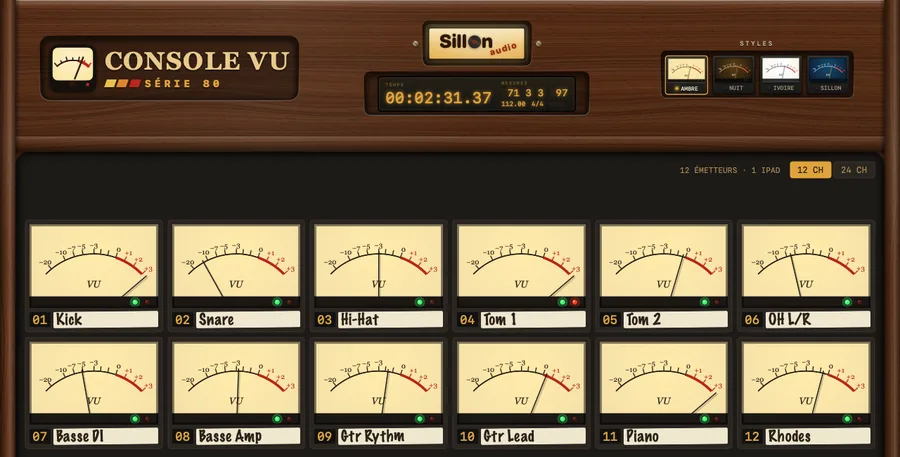
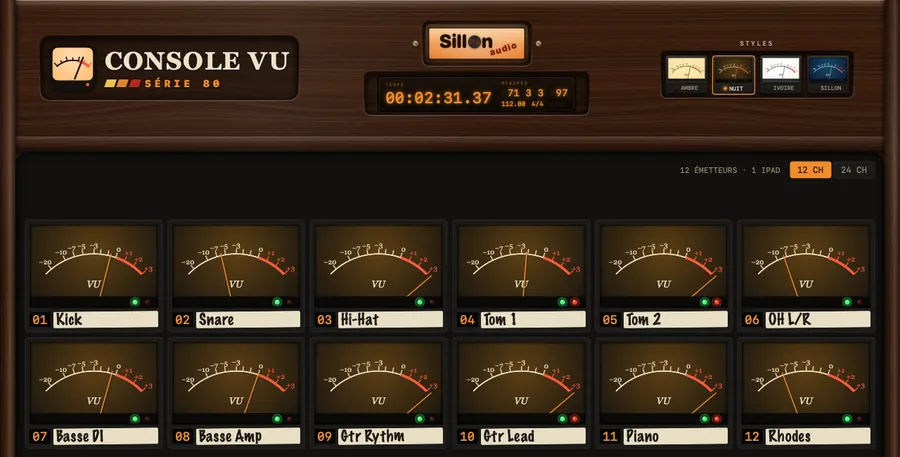
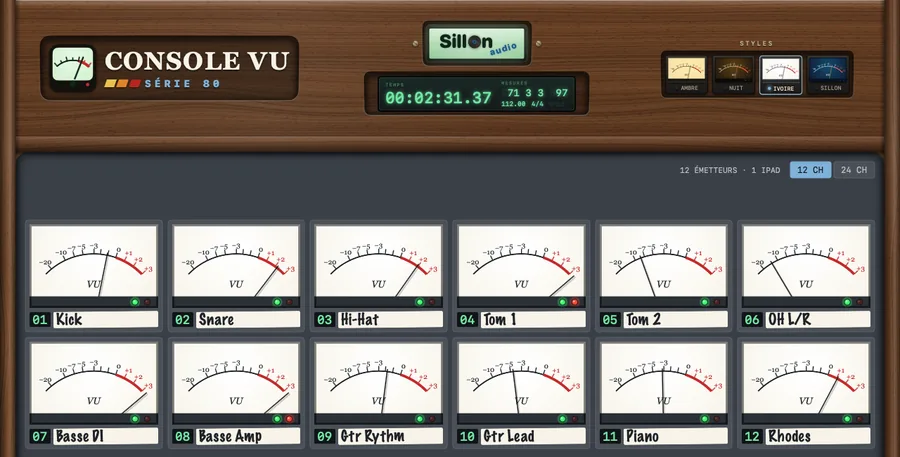
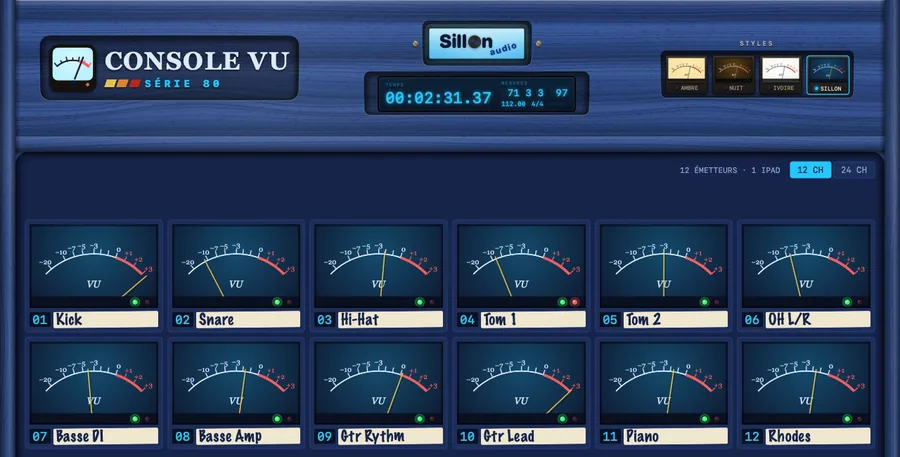
Console VU: your Logic tracks on real VU meters

A small plugin on each track in Logic Pro, and all your tracks light up on a console of needle VU meters in varnished walnut, on a second Mac display or on your iPad. You mix with your ears, and your eyes get back the needles we all loved to watch dance.

Console VU in the Studio Night style: twelve needle VU meters with each track's name, signal and peak LEDs, the time and bar counter, and the walnut header
  • Up to 24 needle VU meters, with the ballistics of a real studio VU
  • A green LED when signal flows, a red LED for peaks, with an adjustable threshold
  • Each track's name handwritten under its meter, like on a strip of tape
  • The time and bar counter, tempo and time signature, live from Logic
  • On your iPad over Wi-Fi: the console right by your hands
  • Your audio passes through untouched: the plugin only measures
  • For Mac and iPad
  • Audio Unit plugin for Logic Pro
  • Made in Quebec
  • $14.99 CAD, one-time purchase, no subscription
Console VU in the Amber 80 style
Amber 80
Console VU in the Studio Night style
Studio Night
Console VU in the British Ivory style
British Ivory
Console VU in the Sillon Midnight Blue style
Sillon Midnight Blue

Now available · Série 80

Stéréo: will your mix hold up in mono?

Your mix sounds wide in your headphones. But on a phone, on the radio or on a Bluetooth speaker? Insert the small Stéréo Émetteur plugin last on the output of Logic Pro: your stereo image appears on a walnut faceplate, with a needle phase meter and a plain-language verdict. On your Mac, or right in the plugin window on your iPad.

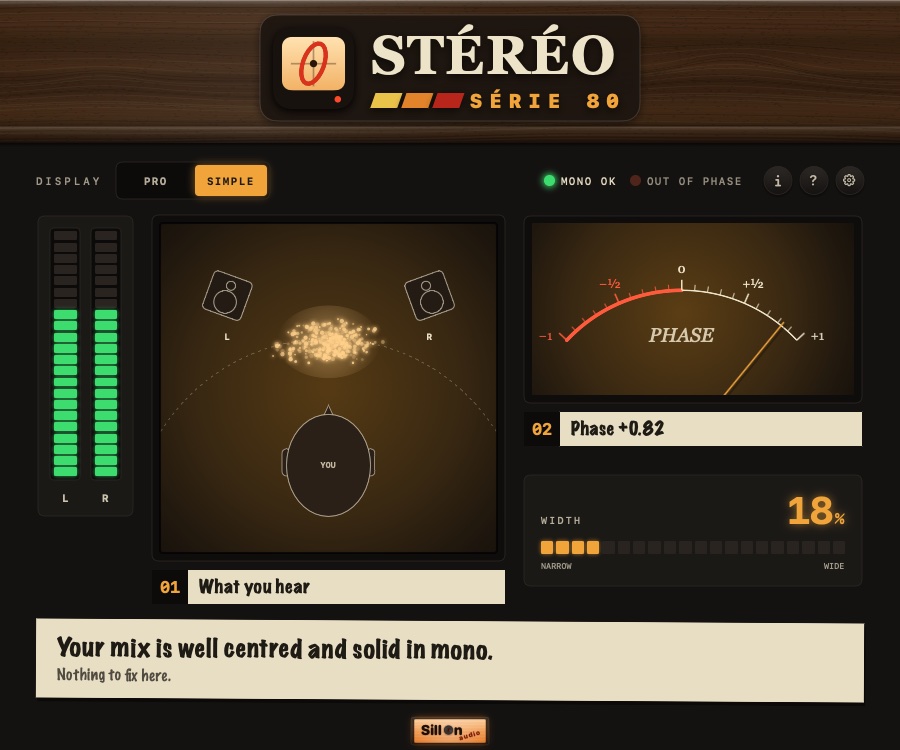
Stéréo in Pro view: the vectorscope in the centre, the needle phase meter at +0.82, width at 18%, left and right bar meters, the MONO OK light and the verdict “Your mix is well centred and solid in mono”
  • The vectorscope: the shape of your stereo image, point by point
  • The Simple view: your speakers, your head, and the cloud of sound between them
  • A needle phase meter, from −1 to +1, that moves like a real needle
  • The width of your mix and the left and right levels
  • MONO OK and OUT OF PHASE lights, and a verdict that tells you what to check
  • Your audio passes through untouched: the plugin only measures
  • For Mac and iPad
  • Audio Unit plugin for Logic Pro
  • Made in Quebec
  • $14.99 CAD, one-time purchase, no subscription
Stéréo's Simple view: two speakers, a head, and the cloud of sound in the centre
The Simple view
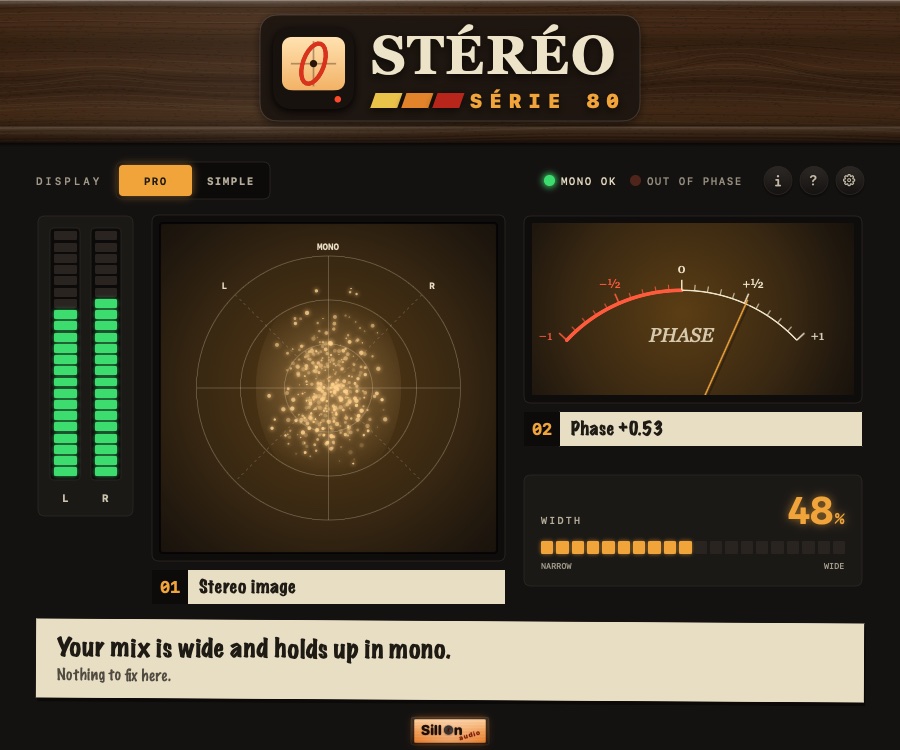
Stéréo with a wide mix: phase at +0.53, width at 48%, solid in mono
Wide and solid
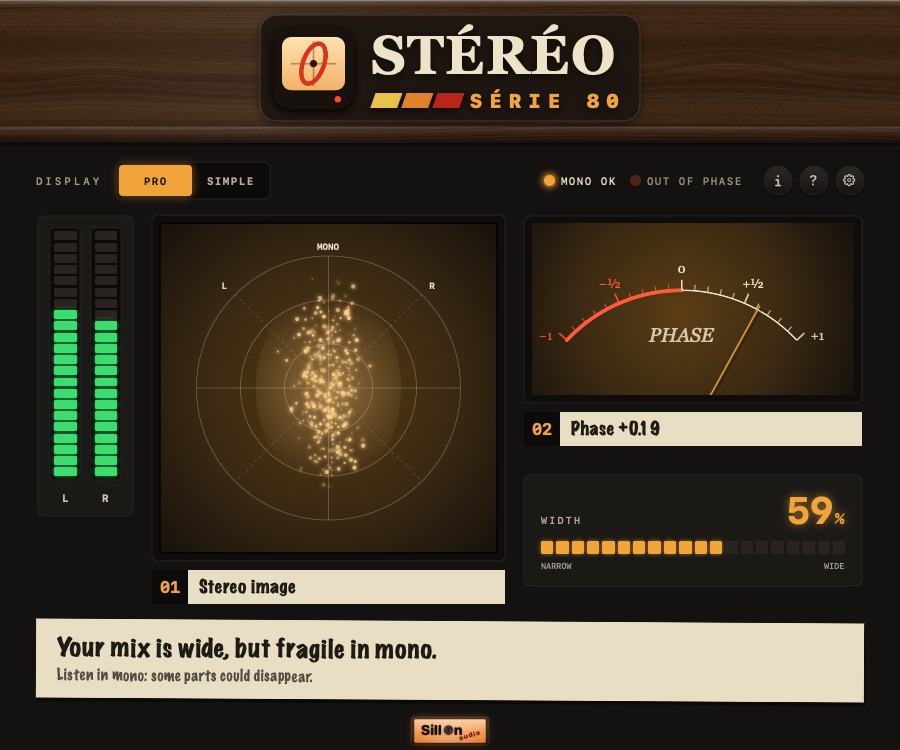
Stéréo with a very wide mix that is fragile in mono
Fragile in mono
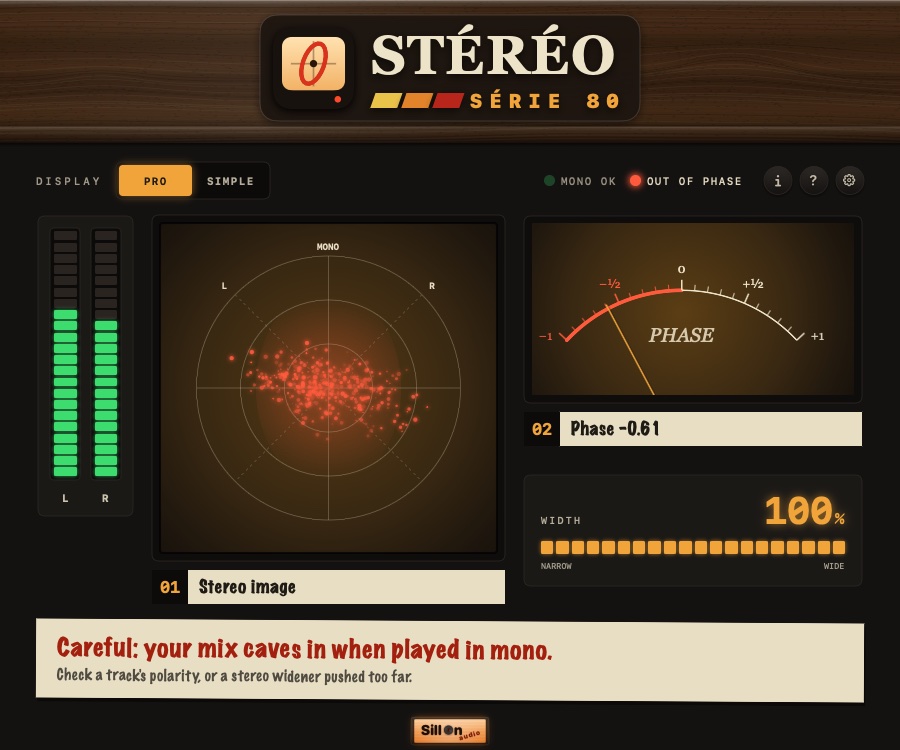
Stéréo on alert: the cloud turns red, the phase drops to −0.61 and the OUT OF PHASE light comes on
Out of phase: the alert
Available on iPhone and iPad · macOS coming soon

Your lights follow the band.
On their own.

Pro lighting, no lighting tech needed. For small bands and solo artists.

Sillon AutoLight on Mac, iPad and iPhone: the On stage screen with the coloured stage and the live buttons

On iPhone and iPad · macOS coming soon · one purchase for all three

Pick a style — rock, country, ballad, party, metal, funk — and play. Sillon AutoLight listens to the band through the microphone and recognizes the intro, the verses, the chorus and the solo on its own, then adapts your DMX lights to each moment: calm for the intro, restrained in the verse, full on in the chorus, moving heads in white on the soloist. No scenes to program, no console to babysit between chords: start the count-in, pick up your guitar, and the lights take off with the band.

✦ NewMagicFixture

Snap the manual.
MagicFixture does the rest.

No definition file for your light? Take a photo of the DMX channel table in its manual: MagicFixture reads it and turns it into a ready-to-use definition.

  • No more typing channels in one by one
  • Reading happens on your device, without internet
  • Check it, tweak it if needed, and you’re set

The screens

Click a screenshot to see it full size.

On stage on iPad: the style, the live stage and the big buttons
On iPhone, the Live page: every button under your thumb
Eight ready-to-play styles, plus your own
Coming soon to Mac: the same app, to run the show from the computer
My lights: library, MagicFixture or QLC+ import
The stage plan: every light in its real spot, pairs mirror each other
The settings: listening, colours, movement, each part of the song and your setlist
  • Eight ready-to-play styles: rock, country, ballad, party, blues, pop, metal and funk/soul, plus your own
  • It recognizes the sections on its own — intro, verse, chorus, solo, ending — and follows the tempo, the band’s energy and the kick drum
  • Big buttons for the live moments: blackout, strobe, solo, full on, end of song, between-songs mood
  • An 8-mode Chaser that follows your stage plan, Follow spot to light up the singer, and the laser in auto or sound mode
  • A Panic button that fades everything out gently
  • A 1-2-3-4 count-in at the song’s tempo: time to pick up your guitar
  • A setlist, one style per song: a Bluetooth or MIDI pedal moves to the next one
  • More than 2,000 lights in the library, MagicFixture, or your QLC+ project (.qxw, .qxf)
  • Your PARs, moving heads, effects, LED bars and lasers, over Art-Net
  • Your whole show fits in one file: a backup, or from one device to another in one move
  • For iPhone and iPad · macOS coming soon
  • DMX over Art-Net
  • Made in Quebec
  • $49.99 CAD, one-time purchase, no subscription

Coming up

Sillon grows with its users. Here's what's on the workbench.

  • Direct sending to PanoramaSend your song list and ISRC codes without retyping anything.

Sillon Audio

Less tech,
more music.

Apps made by and for musicians, easy to understand, so you can spend more time creating.

Your next album deserves a great release

From final mix to album release, without leaving your Mac. Less paperwork, more music.